 QueryGram
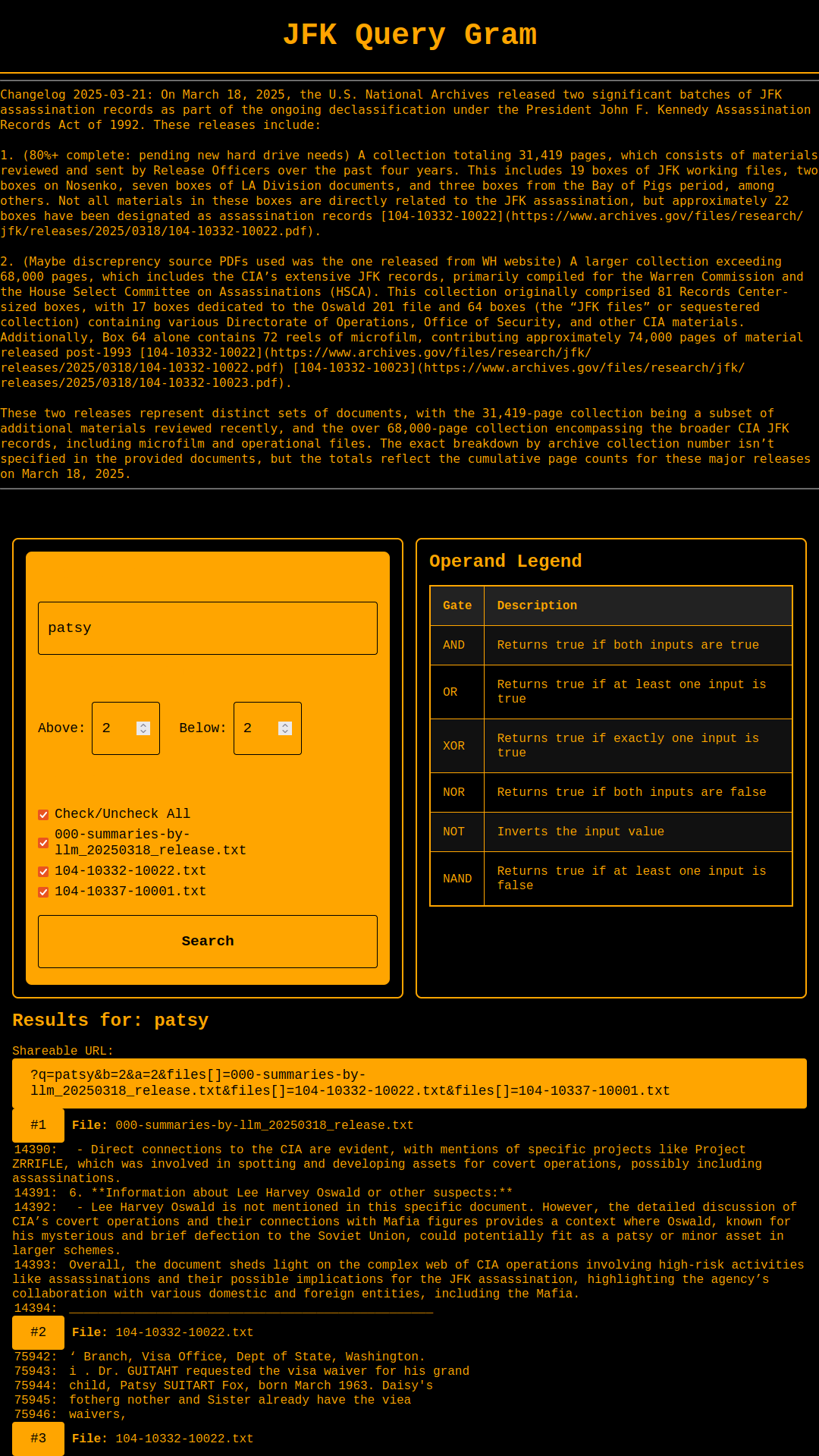
QueryGram

💛 Support Page Telegram directly
💳 Donate
Current Version: 1.1.0
11
Unique Views
3
Free Downloads
0
Donation Downloads
Query Gram - Customizable Document Search Engine
Version 1.10 - Enhanced Features
A powerful, customizable full-text search interface with advanced boolean logic, lazy-loading, streaming results, SRT subtitle support, and file downloads. ---What's New
1. Customizable Branding
- No longer hardcoded to JFK documents
- Fully customizable site title, description, about section, and footer
- Support for special characters and line breaks in content
- HTML support in about section
- Fixed operator precedence (NOT > AND/NAND > OR/XOR/NOR)
- Proper combination of logic gates
- More intuitive query evaluation
- Case-sensitive search option to prevent false matches
- Example:
apple AND orange OR banana NOT pearnow works correctly - Results load in batches of 100
- "Load More" button for seamless browsing
- Auto-scroll detection automatically loads more results when within 800px of the button
- Reduces initial page load time
- Better performance with large result sets
- Results appear as they're found
- Uses PHP's
ob_flush()for real-time output - No waiting for entire search to complete
- Improved user experience for large searches
- Secure login system with password hashing
- Easy configuration management
- Live preview of about content
- Session-based authentication
- Search
.srtsubtitle/transcript files alongside.txtdocuments - Custom parser extracts entry number, timeframe, and text
- Results display entry number, timestamp, and matched text
- Context lines show surrounding subtitle entries
- Combine SRT and text file searches in one query
- Download individual files directly from the file list (⬇ button)
- Download search results as a formatted
.txtfile - Result filenames include date, time, and search terms (e.g.,
2026-03-01-143022-kennedy.txt) - Downloaded result files include query, timestamp, and match count
- Open Graph tags for social sharing (og:title, og:description, og:image, og:url)
- Dynamic title and description pulled from site config
- Improved search engine indexing support
- Full print CSS hides UI chrome and shows clean results
- White background with black text for readable printouts ---
- Navigate to setup page:
2. Improved Boolean Search Logic
3. Lazy Loading
4. Streaming Results
5. Admin Panel
6. SRT Subtitle File Support (New in 1.10)
7. File Downloads (New in 1.10)
8. SEO & Open Graph Meta Tags (New in 1.10)
9. Print Support (New in 1.10)
Installation
First-Time Setup
http://yourdomain.com/setup.php
config_data/ directory
File Structure
/
├── index.php              # Main search interface
├── sum/
│   └── index.php          # Summaries search interface
├── setup.php              # Initial setup wizard
├── admin.php              # Admin panel
├── config.php             # Configuration functions
├── config_data/           # Configuration storage (auto-created)
│   ├── site_config.json   # Site settings
│   └── admin.json         # Admin credentials
├── text/                  # Document files (.txt and .srt)
├── sum/text/              # Summary document files (.txt and .srt)
├── logo.png               # Site logo
├── fav.ico                # Favicon
└── README.md              # This file
Usage
For Site Administrators
#### Accessing Admin Panel/admin.php
<strong>, <a>, <br>)
- Special characters are preserved
- Live preview shows how it will appear
html
This is a full-text search interface for document records.

<strong>Features:</strong>
Boolean search with AND, OR, NOT, XOR, NAND, NOR

Context lines above and below matches

Lazy-loading for large result sets


Visit our <a href="https://example.com">main site</a> for more information.
For Search Users
#### Basic Search
kennedy
| Operator | Example | Description |
|---|---|---|
| AND | kennedy AND oswald | Both terms must be present |
| OR | kennedy OR johnson | At least one term must be present |
| NOT | kennedy NOT oswald | First term present, second absent |
| XOR | kennedy XOR johnson | Exactly one term must be present |
| NAND | kennedy NAND oswald | At least one term must be absent |
| NOR | kennedy NOR johnson | Both terms must be absent |
CIA AND FBI
assassination AND kennedy NOT conspiracy
kennedy OR johnson AND assassination
kennedy OR (johnson AND assassination)
Using NOT prefix:
document NOT classified AND released
CIA will match "CIA", "cia", "Cia", and also words containing these letters like "special"
CIA will only match "CIA" (not "cia" or words like "special")
kennedy will match "kennedy" but not "Kennedy" or "KENNEDY"
.txt and .srt)
.txt copy of your search output
YYYY-MM-DD-HHMMSS-searchterms.txt
Technical Details
Search Logic Implementation
The new search engine uses a precedence-based stack algorithm:php
// Precedence levels
NOT: 3 (highest)
AND, NAND: 2
OR, XOR, NOR: 1 (lowest)
Example Evaluation
Query:apple AND orange OR banana
apple → Stack: [contains(apple)]
AND → Queue operator
orange → Stack: [contains(apple), contains(orange)]
AND → Stack: [apple && orange]
OR → Queue operator
banana → Stack: [(apple && orange), contains(banana)]
OR → Stack: [(apple && orange) || banana]
Case-Sensitive vs Case-Insensitive
Case-Insensitive (default): Uses PHP'sstripos() function
php
stripos($text, "CIA") !== false
// Matches: "CIA", "cia", "Cia", "special" (contains "cia")
strpos() function
php
strpos($text, "CIA") !== false
// Matches: "CIA" only (not "cia" or "special")
Streaming Results
Results stream using PHP's output buffering:php
echo "<div class='match'>...</div>";
ob_flush();
flush();
SRT File Parsing
SRT subtitle/transcript files are parsed into searchable entries:
Entry format: "$number | $timeframe | $text"
Example:  "42 | 00:03:15,000 --> 00:03:18,500 | Kennedy addressed the nation"
Lazy Loading
AJAX-based pagination:?q=query&page=1
?q=query&page=2&ajax=1
URL Parameters
All search parameters are encoded in the URL for shareability:| Parameter | Description | Default |
|---|---|---|
?q= | Search query | — |
?b= | Context lines above match | 2 |
?a= | Context lines below match | 2 |
?files[]= | Selected files (repeatable) | all |
?page= | Pagination page | 1 |
?cs= | Case sensitivity (0 or 1) | 0 |
?ajax= | AJAX/lazy-load request flag | — |
Configuration Storage
Uses flat JSON files (no database required): site_config.json:json
{
"site_title": "My Search Site",
"site_description": "Search documents easily",
"about_content": "Welcome to our search engine...",
"footer_text": "Copyright 2025",
"updated_at": "2025-11-17 12:34:56"
}
json
{
    "username": "admin",
    "password_hash": "$2y$10$...",
    "created_at": "2025-11-17 12:30:00"
}
Security Features
password_hash() with bcrypt
htmlspecialchars()
Browser Compatibility
Performance
Troubleshooting
Setup Issues
Problem: Setup page shows "Setup Already Completed"config_data/ directory to reset
bash
  chmod 755 /path/to/site
Admin Panel Issues
Problem: Can't loginconfig_data/admin.json and running setup again
Search Issues
Problem: No results found.txt files exist in text/ directory
- Verify file permissions are readable by web server
- Try simpler search query first
Problem: Boolean operators not working
term1 AND term2 (correct)
- Example: term1AND term2 (incorrect)
Problem: Getting false matches (e.g., "CIA" matching "special")
Performance Issues
Problem: Search is slowMigration from JFK Version
If upgrading from the original JFK-specific version:bash
cp -r text/ text_backup/
cp -r sum/text/ sum/text_backup/
setup.php
- Configure with your preferred branding
text/ directories
- Your data remains unchanged
---
Customization Examples
Example 1: Legal Document Search
Setup:
  Search thousands of legal documents using boolean operators.

  <strong>Available Collections:</strong>
  - Supreme Court Cases (1950-2025)
  - Federal Court Rulings
  - State Court Documents
Example 2: Academic Research
Setup:
  Search academic papers and research documents.

  <strong>Search Tips:</strong>
  Use AND to combine concepts: <em>machine AND learning</em>
  Use OR for alternatives: <em>neural OR network</em>
  Use NOT to exclude: <em>AI NOT robotics</em>
Example 3: Corporate Knowledge Base
Setup:
  <strong>Confidential - Internal Use Only</strong>

  Search company policies, procedures, and documentation.

  For support, contact IT at: <a href="mailto:it@company.com">it@company.com</a>
Support
For issues or questions:config.php, index.php, etc.
License
This software is provided as-is. Modify and use as needed for your purposes. ---Changelog
Version 1.10 (2026-03-01)
.txt file with date-stamped filename
Version 1.07 (2025-11-17)
Version 1.06 and earlier
Credits
Original concept: JFK Query Gram by Amfile.org at Page Telegram Volunteer ServicesDownload Options
Free Download: Source code is freely available below.
Compiled Versions: Support development with a PayPal donation.
Compiled Versions: Support development with a PayPal donation.
Free Downloads
📦 Download Source CodeChangelog
No changelog available.